Before you build anything, you need a clear-eyed view of the tools and categories that actually matter for an insurance agency. The landscape looks confusing because there are too many vendors shouting for attention, every LinkedIn influencer is pitching "the future of insurance," and half the sales decks you sit through describe capabilities that don't exist yet. The good news: most of those tools do not apply to you. This lesson cuts the noise.
By the end of this lesson you will know the four categories of AI tools that matter for a small-to-midsize agency, which specific products are worth your money, what to ignore, and the minimum viable stack you need to run every workflow in this course.
Four categories that matter
General-purpose chat models. ChatGPT, Claude, and Gemini. These are your workhorses. You will use one of them for drafting emails, summarizing client threads, extracting data from documents, translating dense carrier language into plain English, classifying leads, and rubber-ducking your own thinking. Every single workflow in the rest of this course touches a chat model somewhere.
The honest truth about which one to pick: for insurance work specifically, Claude is the strongest writer and the best at following nuanced instructions without going off-script, ChatGPT has the widest feature set and the most integrations, and Gemini is the cheapest if you are already on Google Workspace. Any of the three is fine. Switching between them costs you more in friction than you save in capability. Pick one, subscribe to the paid tier (around $20/month), and commit for at least 90 days before you even consider switching.
Document and OCR tools. These extract structured data from PDFs and scanned forms. Relevant for carrier statements, declarations pages, ACORD forms, commission reports, and loss runs. Examples include the document features built directly into Claude and ChatGPT (which handle 80 percent of agency document work natively), plus dedicated tools like Docparser, Mindee, and Parseur for higher-volume or more consistent extraction.
For most agencies, you will not need a dedicated OCR tool. Claude and ChatGPT's native PDF handling covers the common cases. You only need a dedicated tool if you are processing the same form type at scale every day, which is usually a commercial-heavy agency with a lot of COI or loss run volume.
Workflow automation. Zapier, Make.com, and n8n. These are the glue between your AI, your email, your AMS, your calendar, your spreadsheets, and everything else. They turn one-off AI prompts into scheduled, triggered, multi-step workflows. You need exactly one of these.
Quick comparison: Zapier is the easiest to learn, has the most integrations, and is the most expensive at scale ($30 to $200+ per month depending on volume). Make.com is more powerful, slightly harder to learn, and cheaper. n8n is the most flexible, open-source, can be self-hosted, and has the steepest learning curve. If you are new to automation, start with Zapier. If you already have a technical friend in your circle, Make.com is the best value. Do not start with n8n unless you have a background in scripting.
Vertical AI for insurance. A handful of startups are building AI specifically for insurance workflows — tools like Roots Automation for commercial back-office, Indico Data for document processing, and several newer entrants in the quoting and renewal space. Most are not yet ready for solo or small-agency use because their pricing assumes a carrier-scale deployment. A few are. We will flag the ones worth watching at the end of the course, but the honest answer is that general-purpose tools plus a workflow layer get you 80 percent of the value at 10 percent of the cost. Save your budget for the generalist stack until you have outgrown it.
What you can ignore
Ignore anything that requires a custom integration into your AMS unless your AMS vendor has already built it. Custom AMS integrations cost $5,000 to $50,000 and break every time the AMS updates. If the tool you are looking at says "contact us for enterprise pricing," you are not the customer.
Ignore any tool that needs your E&O coverage to be rewritten. Full stop.
Ignore any tool that claims to replace a licensed producer. The technology is nowhere close, the legal exposure is real, and the marketing is dishonest.
Ignore, for now, everything in the "AI agents" category that promises to autonomously run your inbox, your phone, or your sales pipeline. The technology is real but it is not ready for licensed-profession deployment. The failure modes are too expensive. Wait two years, watch the category mature, and revisit. The agencies that wait will be fine. The agencies that deploy autonomous AI agents in 2026 will be paying for the privilege of being everyone else's R&D lab.
Ignore "AI-enhanced" features bolted onto tools you already use for other reasons. The AI features in most AMS platforms right now are window dressing. Use your real AI tools for real AI work and let the AMS be an AMS.
The thinnest working stack
The thinnest working stack for an agency is:
- One chat AI subscription — Claude, ChatGPT, or Gemini Pro. $20/month.
- One workflow tool — Zapier, Make, or n8n. $30-$100/month depending on volume.
- One spreadsheet — Google Sheets or Excel. Already in your stack.
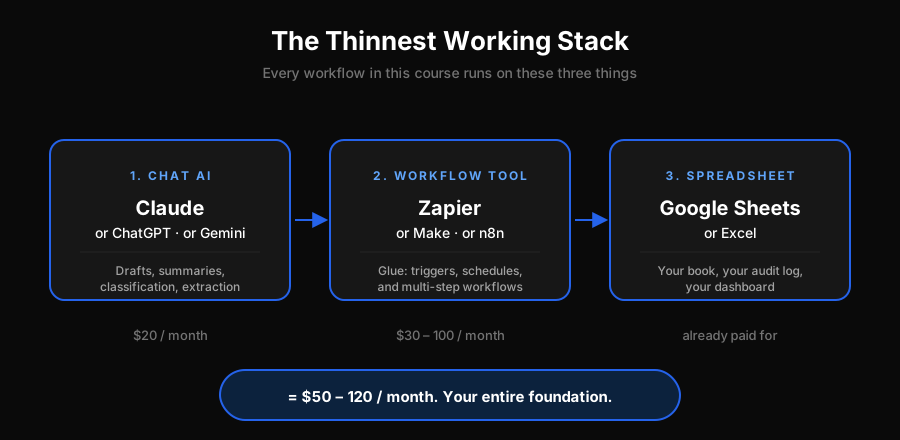 The thinnest working stack: Chat AI → Workflow Tool → Spreadsheet, totalling $50-120 per month
That is it. $50 to $120 a month. Every workflow in this course runs on this stack. Do not add anything else until you have those three wired together and producing value for at least 60 days.
Agents who try to stack five tools before building one workflow always fail. Agents who build one workflow with three tools and scale from there always succeed. The discipline is knowing the difference.
A tour of your current toolbox
Before you buy anything new, open your current software stack and write down everything you pay a subscription for that touches AI, automation, email, or document handling. Most agencies discover they already pay for two or three tools they don't fully use.
Common findings when agencies do this audit:
- You already have Microsoft Copilot or Google Gemini bundled into your email subscription
- You already have Zapier access through a bundled tool you forgot about
- You have two CRM tools doing the same job
- You have three document signing tools, of which only one is being used
- You have a chat AI subscription on your personal account that you have been expensing to the agency anyway (fix this — use a business account)
Before you spend a dollar on new tools for this course, audit the current stack. You probably already have half of what you need.
The hype filter
One more mental model before we move on. Any time you see a new AI tool pitched at insurance agencies, run it through four filters:
- Does it need my AMS to have an open API? If yes and your AMS doesn't, the tool will never work for you. Walk away.
- Can I trial it for 14 days without a credit card? If no, they are not confident enough in the product for small agencies. Walk away.
- Is the pricing posted on the website? If no, you are not the customer. Walk away.
- Does it solve a problem I already feel? If you have to be convinced the problem exists, the tool is not solving a problem — it is creating one for you to buy a solution to. Walk away.
Four walk-aways leave you with a very short shopping list. That is the point. Your time is the scarce resource, not your budget.
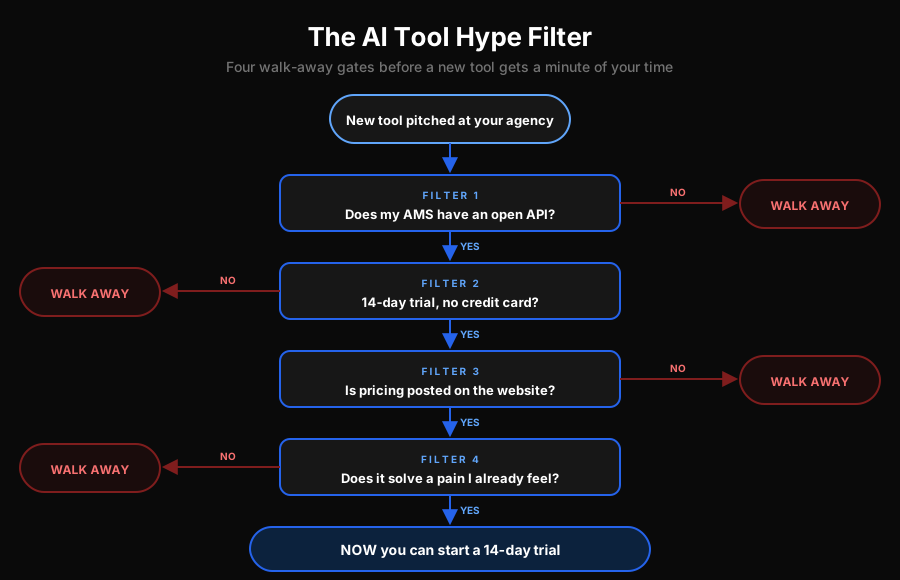 The AI tool hype filter: four sequential yes or no questions that every new tool must survive before it earns a 14-day trial — open API, free trial, public pricing, and a real pain you already feel
Do this today
Two concrete actions:
- Pick your chat AI. Claude, ChatGPT, or Gemini. Subscribe to the paid tier on a business account. Do not overthink it. You can change later.
- Audit your current subscriptions. Open your credit card statement, list every SaaS tool the agency pays for, and mark the ones that touch AI, automation, email, or documents. Circle the ones you are not fully using.
You now have your chat AI and you know what is already in your toolbox. That is the entire foundation for the rest of the course.
Next up
In the next lesson we tackle the unglamorous but critical prerequisite for any AI workflow: data hygiene. Bad data in means bad AI out. Before you wire your first automation, your AMS exports need to be clean enough that the tools don't trip over obvious errors. That is next.